
The Complete TSA Lock Guide: How to Reset Your Lock & Recover a Forgotten Combination
Every traveler has experienced that moment of panic when a suitcase lock won't open. At LUGGEX, we believe great travel experiences begin with practical knowledge. Instead of keeping troubleshooting knowledge exclusive to our own products, the LUGGEX Team created this guide to help travelers everywhere.
This article covers the three most common TSA-approved lock designs, explains how to reset each one correctly, and shares a practical technique that may help recover a forgotten combination. These methods aren't limited to LUGGEX luggage—they're designed to work with many TSA combination locks used across the luggage industry.
We're proud to support not only our own customers, but the entire travel community. If this guide helps you unlock your suitcase, then we've accomplished exactly what we set out to do.
1. Identify Your TSA Lock
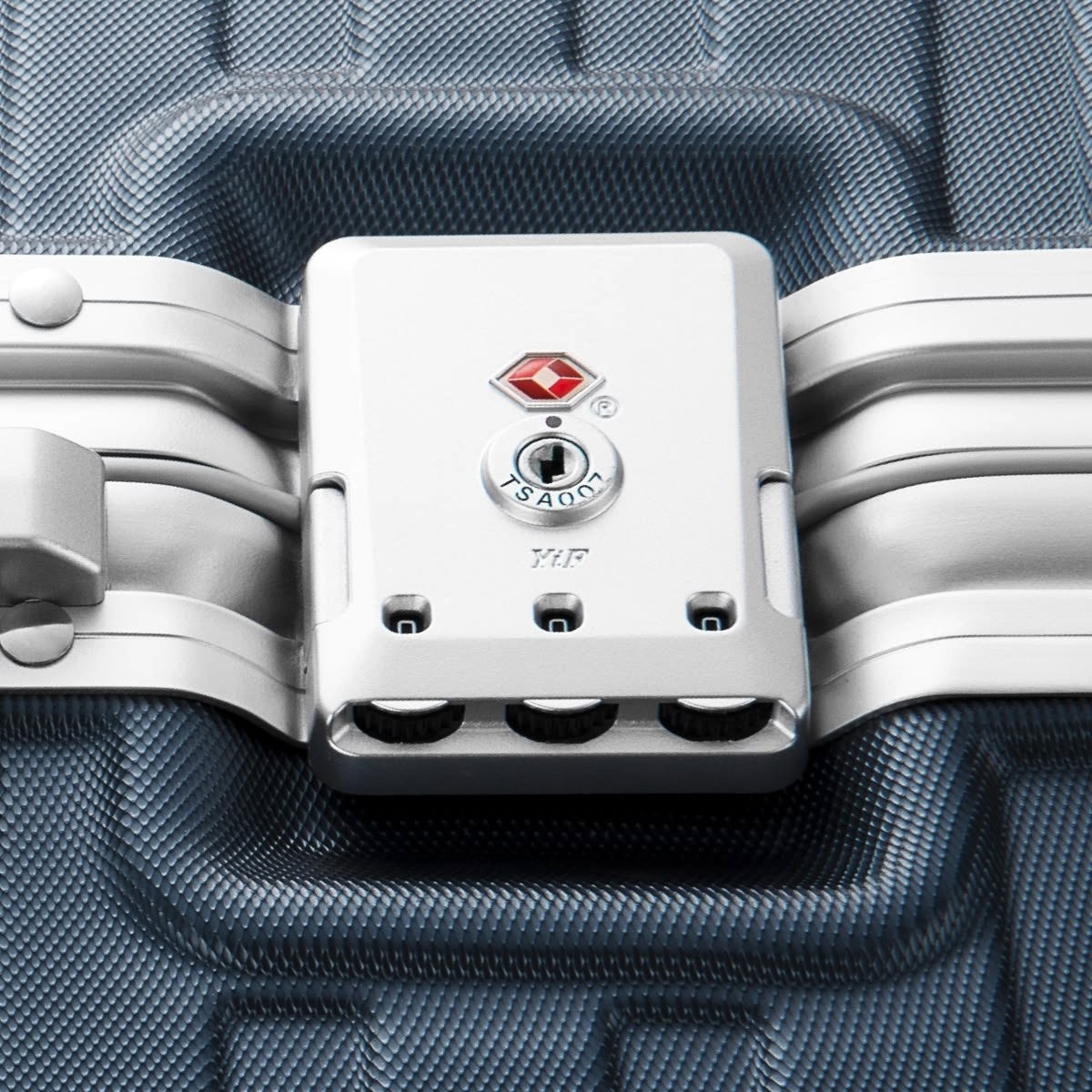
You may see a marking such as TSA007 or TSA008 next to the keyhole. This marking generally identifies the security key system used by authorized airport security personnel. It does not necessarily identify the lock's complete product model or reset method.
Numbers such as TSA-16138, TSA-16009, and TSA-180051 are used in this guide to distinguish between different physical lock designs.
This means two locks may both display "TSA007" near the keyhole but still have different buttons, reset mechanisms, or operating instructions.
Do not select a tutorial based only on the TSA007 or TSA008 marking. Compare the following features instead:
• The overall shape of the lock
• Whether it opens with push buttons, a slider, or a twist selector
• The location and shape of the reset control
• The product photo shown in each section
Luggage commonly uses the following three lock designs:


💡 Tip: LUGGEX luggage comes with three common types of TSA-approved locks; the factory default code for all of them is 0-0-0. Below we provide clear photos of each lock, step-by-step instructions, and video links to guide you through setup and use.
2. How to Set Your TSA Lock
TSA-16138 — TSA Push Button Combination Lock
Step-by-step set TSA Lock Guide:
- Turn the dials to 0-0-0 (Original Combination) and push the two buttons (3) to open the lock.
- Locate the clasps on the back of the lock and switch it from "OFF" to "SET" on both locks.
- Slide the "Reset button" (1) from "OFF" to "SET".
- Slide the "Reset button" (1) back to "OFF". Your new code is now set and activated.
💡 Tip: Test your new combination to ensure it works as intended.

Video Link: https://www.youtube.com/watch?v=D6KG1i0D6tU
This TSA lock is typically used on aluminum-frame suitcases, specifically on LUGGEX's most renowned zipperless series. Our data research shows that the lock was designed to protrude beyond the horizontal line of the suitcase side, which easily makes the lock the first part to be hit and contacted when the suitcase is in use or checked. Therefore, after multiple improvements, we have made the lock height as parallel to the suitcase as possible, which can reduce the probability of lock damage to a certain extent and avoid the problem that the lock structure cannot be opened due to being knocked askew.

From LUGGEX

From other brand
This innovation is exclusive to the market. Below is our entire popular range, where you can find out more:
https://www.luggex.com/collections/zipperless
TSA-16009 — TSA Slider Combination Lock
Step-by-step set TSA Lock Guide:
- Turn the dials to 0-0-0 (Original Combination) and push the two buttons (3) to open the lock.
- Locate the clasps on the back of the lock and switch it from "OFF" to "SET" on both locks.
- Slide the "Reset button" (1) from "OFF" to "SET". Set the "Dials" (2) to your desired code (e.g., 8-8-8).
- Slide the "Reset button"(1) back to "OFF". Your new code is now set and activated.
💡 Tip: Test your new combination to ensure it works as intended.

Video Link: https://www.youtube.com/watch?v=N6HEiVrL3gM
TSA-180051 — TSA Twist Combination Lock
Step-by-step set TSA Lock Guide:
- Turn the dials to 0-0-0 (Original Combination).
- Push down the "Reset button" with a pen or pointed object until you hear a click.
- Hold down the "Reset button" and turn the dials to set your preferred combination.
- Turn the "Twist Selector" to lock in the new combination.
- Release the "Reset button"; it will pop back up, and your combination will be set.

Video Link: https://www.youtube.com/watch?v=N6HEiVrL3gM
3. Forgot Your TSA Lock Combination?
Here's a method might sound crazy, but trust me—it actually works and compatible with almost any type of TSA lock.
Written Guide:
You can use a thin but fairly rigid plastic strip, such as:
- The stiff edge of a snack package
- A small piece of rigid plastic packaging
- The backing sheet from an eyelid tape product
- Any thin plastic material that can fit into the gap beside the combination dial
Insert one corner of the plastic strip vertically into the narrow gap next to a combination wheel.
Hold the strip steady with one hand while slowly rotating the dial with the other.
At one particular number, you may notice the plastic strip drops slightly farther into the gap or catches on a groove. Record that number.
Repeat the same process for each dial.
According to some users' experience, the recorded numbers may need to be adjusted by several positions (for example, ±1 to ±5) depending on the lock design.
One user reported that the correct combination for their suitcase was obtained by moving five numbers forward from the detected positions.
Note: Results vary depending on the lock mechanism and manufacturing tolerances.
Video Guide:
Why can this method be successful? What is its underlying principle?
Each visible number dial is mechanically connected to an inner wheel. That inner wheel has one special opening, commonly called a gate, notch, or groove.
A locking bar sits behind the three wheels. The solid sections of the wheels block the bar from moving. The lock can open only when the gates on all three wheels line up with the locking bar's release path at the same time.
Note: The methods shown above work with most suitcases, but results may vary depending on the lock's design and condition. Use them only on luggage you own or are authorized to access, and never force the lock or damage the case.
4. A Final Note from the LUGGEX Team
From all of us at LUGGEX, we hope this guide has made your TSA lock easier to understand and helped you get back to your journey with less stress. When it's time for your next adventure, we invite you to explore LUGGEX.com and find the suitcase that best fits your travel style and needs.
Wherever your next destination may be, the LUGGEX Team wishes you smooth packing, stress-free travel, and many memorable journeys ahead.
5. Frequently Asked Questions
What is the default code for a LUGGEX TSA lock?
The factory default is 0-0-0. Center all three digits precisely on the indicator line before opening the lock.
Can I reset my TSA lock if I forgot the code?
Usually not while it is closed. First recover the current combination and open the lock; then use the reset mechanism to create a new code.
Does LUGGEX luggage come with a TSA key?
No. The keyhole is reserved for authorized airport security officers, so a traveler key is not included.
What should I do if my TSA lock is stuck?
Check the dial alignment, remove pressure from the latches, and make sure nothing is caught in the closure. Do not force the lock or spray oil into it. Contact Support if the problem continues.
Note:Some of the video content was sourced from the internet.
Share:
How to Get Through Airport Security Faster With a Front-Opening Carry-On
Airport Travel Tips for First-Time Flyers